# From 200 Line Nightmare to 10x Speed: Optimizing SQL Like a Pro
> I inherited a messy 200-line SQL query and made it 10x faster. Here’s how I optimized the queries, separated concerns and made the code actually maintainable.
By Ali Alshehri · Published 2025-01-31 · 6 min read · Canonical: https://www.ali-sh.com/posts/200-line-nightmare
## The Mess I Inherited
When I first joined the company, I went through the codebase to get a feel for how it was structured.
Then I reached the core functionality in the backend services and was welcomed by a 200 line SQL query. No matter how
many times I read it, I couldn't make sense of it: it was a big mess of joins and subqueries, and I wasn't even sure what it was doing.
It felt like navigating a jungle in the dark. Fixing it (not to brag, but I literally 10x'ed it lol) is one of the things
I’m proudest of, and it made me a better engineer.

## The Philosophy of Separation of Concerns
The usual definition of separation of concerns is that each component of a system should be responsible for only one thing. To me
that's vague, and taken literally it can leave a codebase with 1000 components, functions or classes that do nothing but bloat it.
I'm not sure that's the right way to go about it.
I think of it as each component owning one middle sized piece of functionality or logic. It shouldn't do too much or too little:
it should own one thing, and that thing should be as small as possible, yet as big as possible at the same time, if that makes sense.
Many people think the database is only meant to **store** data, but it's actually meant to **store & manage** it.
I used to think logic belonged in the backend service rather than the database, because database logic might create bottlenecks and slow things down.
After some research I found the opposite: a lot of calculations run faster when the database handles them instead of **your code**,
because the major databases already have built in functions for your case, or are optimized for it behind the scenes.
## The Art of Database Design
Good database design means getting the relations and data types right, and also knowing how the data
will be used, retrieved and queried. When you design the structure, you need a general idea of how each group of data will be queried.
A database model can be solid and still make querying complex and slow if nobody thought about the queries, sometimes to the point
of having to rewrite the entire model.
In my case, restructuring the database model wasn't an option: we didn't have the time, with many business and product plans to follow.
So I gave in and tackled the 200 line SQL query that was causing me so much pain in the first place. One reason it was so large was the
lack of separation of concerns. By creating more controllers and bringing the complexity of the query down, I made the smaller queries
much more readable, performant and easier to maintain.
Many queries could also be grouped together. For example, one query fetched the user object, but getting each user's photo URL
(to retrieve it from the bucket) took a separate query that ran in a loop for every user fetched. Fetch 100 users and you run
100 more queries for their photos. I grouped them into a single query that gets all the user photos at once.
### **Before Optimization: Fetching Users and Their Photos Separately**
```typescript
import { db } from "@/db";
import { users, userPhotos } from "@/db/schema";
import { sql, eq, desc } from "drizzle-orm";
async function getUsersWithPhotos() {
const fetchedUsers = await db.execute(sql`
SELECT
users.id,
users.name,
users.email,
userProfiles.bio
FROM users
LEFT JOIN userProfiles ON users.id = userProfiles.userId
`);
for (const user of fetchedUsers) {
const photo = await db
.select({ url: userPhotos.url })
.from(userPhotos)
.where(eq(userPhotos.userId, user.id))
.orderBy(desc(userPhotos.createdAt))
.limit(1);
user.photo = photo.length > 0 ? photo[0].url : null;
}
return fetchedUsers;
}
```
### **After Optimization: Fetching Users and Their Photos Combined**
```typescript
import { sql } from "drizzle-orm";
async function getUsersWithPhotos() {
const fetchedUsers = await db.execute(sql`
SELECT
users.id,
users.name,
users.email,
userProfiles.bio,
latestPhotos.url AS photo
FROM users
LEFT JOIN userProfiles ON users.id = userProfiles.userId
LEFT JOIN (
SELECT userPhotos.userId, userPhotos.url
FROM userPhotos
WHERE userPhotos.createdAt = (
SELECT MAX(createdAt)
FROM userPhotos p
WHERE p.userId = userPhotos.userId
)
) AS latestPhotos ON users.id = latestPhotos.userId
`);
return fetchedUsers;
}
```
Another big thing to always keep in mind: **fetch what you need**. Even with a small query, fetching the entire user object and
all its related data every time I only needed a few fields wastes resources and adds a lot of overhead. If you want your app to be fast,
rely on database level filtering instead of fetching the whole object and filtering it in your code.
### **Inefficient: Fetching All User Data**
```typescript
import { sql } from "drizzle-orm";
async function getUsersWithPhotos() {
// Fetch ALL user data (including unnecessary fields)
const users = await db.execute(sql`SELECT * FROM users`);
const filteredUsers = [];
for (const user of users) {
const photo = await db.execute(sql`
SELECT url FROM userPhotos WHERE userId = ${user.id} ORDER BY createdAt DESC LIMIT 1
`);
// We manually extract only the necessary fields
filteredUsers.push({
id: user.id,
name: user.name,
photo: photo.length > 0 ? photo[0].url : null,
});
// We fetched ALL columns but only needed three
// making the query unnecessarily slow.
}
return filteredUsers;
}
```
### **After Optimization: Fetching Only Necessary Data**
```typescript
import { sql } from "drizzle-orm";
async function getUsersWithPhotos() {
const users = await db.execute(sql`
SELECT
users.id,
users.name,
latestPhotos.url AS photo
FROM users
LEFT JOIN (
SELECT userPhotos.userId, userPhotos.url
FROM userPhotos
WHERE userPhotos.createdAt = (
SELECT MAX(createdAt)
FROM userPhotos p WHERE p.userId = userPhotos.userId
)
) AS latestPhotos ON users.id = latestPhotos.userId
`);
// No extra filtering needed, already optimized!
return users;
}
```
## The 10x Optimization
The optimizations above may seem
small, like making queries smaller and fetching only what we need, but they make a big difference, especially in large codebases
or services that have to be fast.
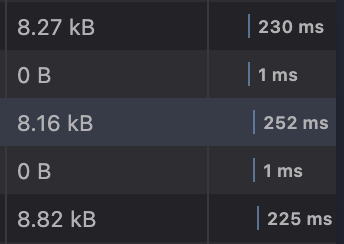
All of this started because I was responsible for a feature that needed **infinite scrolling**. To put it into perspective: after
implementing the feature, and before the optimizations, each page (the section you scroll down to) took about 3 seconds to load.
Imagine scrolling Instagram or TikTok and waiting 3 seconds every few posts for the next ones to load.
I'm very proud that all the digging paid off: I brought it down to an average of under **0.3 seconds!**
Now it feels instant: you don't even notice you've reached the end of the page.
### **After Optimization: Average response time**
## Bonus: Pro Tips learned from this Experience
A few smaller things that made a big difference in how my queries performed:
### Indexing is Your Best Friend
Indexes are like the table of contents in a book: they help the database find what it’s looking for without scanning every page.
If you query a column often (like userId or accountName), slap an index on it. Be careful though: over indexing slows down
writes, so only index what you actually need.
### Use EXPLAIN to Understand What’s Happening Under the Hood
If you’re not using EXPLAIN (or its equivalent in your database), trust me, you’re wasting your time.
It shows how the database executes your query: which indexes it uses, how it joins tables, and where the bottlenecks are.
When I ran EXPLAIN on that monstrous 200 line query, I could see exactly where the database was struggling: a missing index,
a poorly optimized join, or a subquery running way too many times. From there I refactored the query step by step.
### Test, Test, and Test Some More
Optimization isn’t one and done. Test your changes thoroughly to make sure they actually improve performance:
small datasets, large datasets, edge cases, you name it. And don’t rely only on local testing; run your optimized queries in a
staging environment that mimics production as closely as possible.
After optimizing the infinite scroll feature, I ran a bunch of tests to simulate real world usage:
I loaded hundreds of items, scrolled through pages, and watched the response times.
Only after seeing consistent sub 0.3 second loads did I feel confident shipping the changes in the next release.

## Lessons Learned: The Journey to Becoming a Better Engineer
This whole experience taught me a lot. Here’s the TL;DR:
- **Separation of Concerns is a Guiding Light, Not a Rulebook**: don’t split everything into a million tiny pieces.
Keep your components focused, but not overly fragmented. Think of it like organizing your closet: you don’t want one giant
pile of clothes, but you also don’t want a separate drawer for every sock.
- **Databases Are Smarter Than You Think**: let the database do the heavy lifting. It’s optimized for this stuff,
and chances are it’ll do a better job than your code. Trust it, but understand how it works so you can use it well.
- **Optimization is a Mindset**: think about how your code talks to the database, how data flows through your system,
and where the bottlenecks are. Small improvements add up, and over time they can lead to a 10x boost in performance.
- **Patience and Persistence Pay Off**: when I first saw that 200 line query, I wanted to cry. Breaking it down,
understanding it piece by piece, and iterating on it taught me so much.
- **Celebrate the Wins**: bringing that query down from 3 seconds to 0.3 seconds felt like winning a marathon.
Moments like that remind you how far you’ve come as an engineer.
So if you’re staring down a massive, convoluted query or a database model that feels like a maze, don’t panic.
Grab a coffee and start chipping away at it. Even the small fixes add up.
And who knows? You might just 10x your performance like I did ^-^.